Read every line with who said it and when.
CallSniper turns each recording into a transcript a reviewer can work in. Every line carries the speaker, the second it was said, and a confidence value that points at the passages worth checking against the audio. The sample below is CALL 028, a callback request where the caller's number was never read back.
- Agent0.98
Thank you for calling Keelhaven Property Management, this is Dana. How can I help you?
- Caller0.95
Hi. There is a leak under the kitchen sink in unit 4B, and it is getting worse.
- Agent0.97
I am sorry about that. Can I get your name and the best number to reach you?
- Caller0.83
Marcus Bell. The number is 512 555 0148.
- Agent0.96
Got it. And which building is that?
- Caller0.61
Carrow Street, the one across from the pharmacy.
- Agent0.95
Thank you. I have that down as an urgent maintenance request for 4B.
- Caller0.93
Okay, good.
- Agent0.97
I have your message. Someone will call you back.
- Caller0.92
Okay, you can reach me at the number I gave you.
- Agent0.97
Is there anything else I can help with tonight?
- Caller0.78
No, that is everything. Thanks for your help.
- Agent0.98
Thank you for calling Keelhaven. Have a good evening.
Sample conversation. No customer recordings.
The transcript as a reviewer reads it.
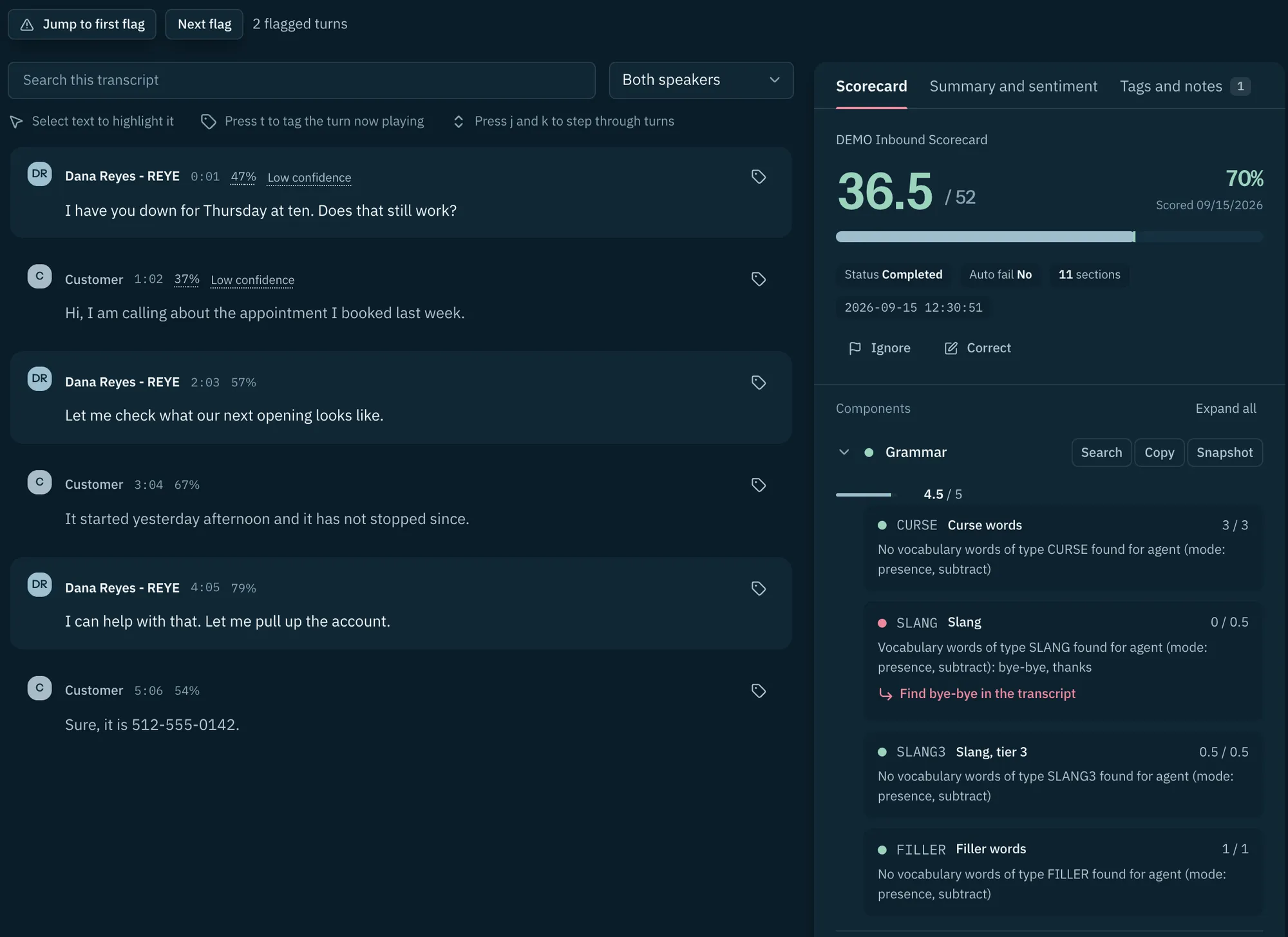
Search the words, filter to one speaker, and step through the turns from the keyboard. A low confidence value marks the lines worth checking against the audio.
Three things on every line.
Each part of a transcript line answers a question a supervisor asks while the recording plays.
| What you get | What it means in review |
|---|---|
| Speaker labels | Speaker labels help a reviewer follow agent and caller turns. Mono recordings, background noise, and multiple speakers can cause attribution errors, so check disputed labels against the audio. |
| Timestamps | Each line is stamped to the second. A reviewer clicks 00:42, hears the exchange, and attaches a note to that exact moment. |
| Confidence per line | A value on every line shows how sure the transcript is about that passage. Low values mark noisy audio, crosstalk, or an unusual name, and those are the lines to check against the original recording. |

Bring one hard call.
After the sample demo, agree an evaluation using recordings your reviewers know well. Include calls they scored differently so the review starts with a useful comparison.
Three recordings worth bringing.
- A noisy recording, the kind with road noise or a speakerphone in a warehouse.
- A call with two names that sound alike, so speaker labels and spelling get a real test.
- The transcript your team disputed, where two reviewers heard different things.
CallSniper processes them in the first session, and the review runs on the team's own standards.
Schedule a demoBefore the pilot.
Two questions every QA lead asks about transcription, answered plainly.
How accurate is it on bad audio?
Mono audio, overlapping speech, and background noise can confuse speaker attribution. Include difficult recordings in your evaluation and compare the transcript with the original audio before relying on a score.
What formats and languages does it accept?
Recordings arrive by bulk upload in the common audio and video formats. Language coverage and any format outside that list get confirmed in the pilot with the team's own files.
Put a difficult recording in front of it.
Upload the call the team argued about and read it back with speaker labels, timestamps, and confidence on every line.